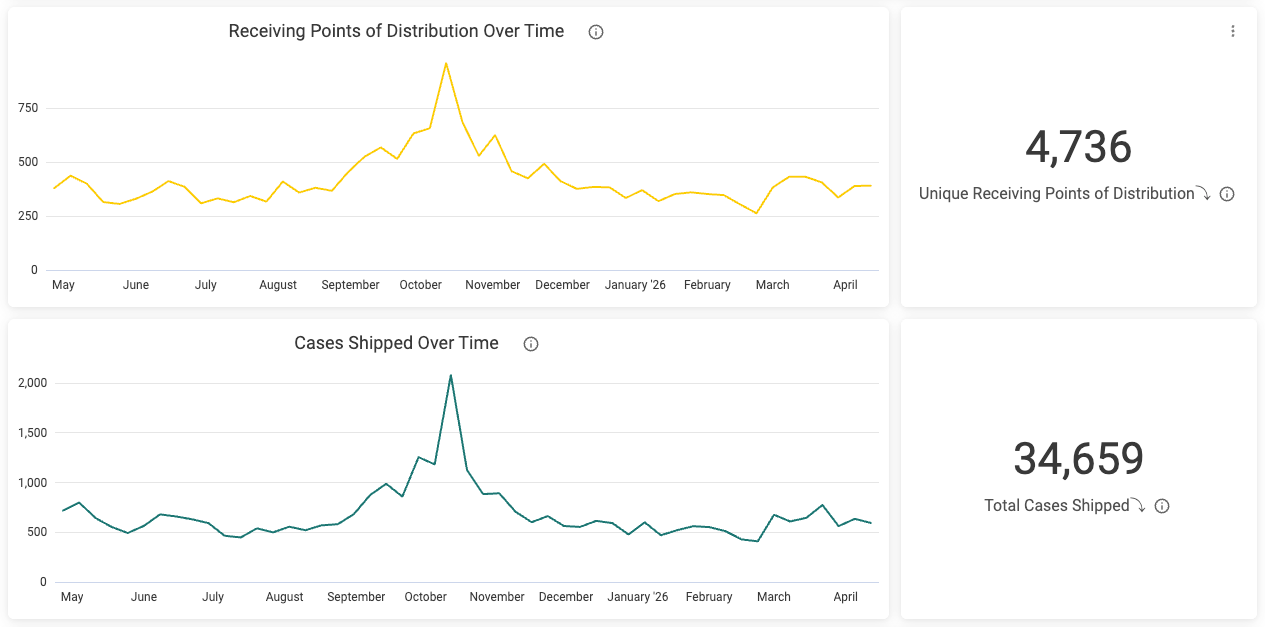
The Explore Distribution dashboard allows you to filter for any timeframe, so you can understand your distribution trends at any point in time.This dashboard is divided into three sections:
Overview : See a snapshot of what’s going on with your distribution.
Drivers : Understand the events that contribute to your distribution’s growth or decline.
Details : Dig in to granular information that you can act on to improve your distribution.
Also, distributor dashboards are based on shipping sales.
Scanning (Or Receiving) Points of Distribution Over Time
These graphs show unique store + product combinations over time. Distributor dashboards will display “Receiving Points of Distribution Over Time,” which are based on shipping sales.
These graphs display unit movement over time. Retailer dashboards will display “Unit Sales Over Time,” showing the number of units sold at stores. Distributor dashboards will display “Cases Shipped,” showing the number of units shipped by that distributor.
Unique Scanning Points of Distribution, Total Unit Sales
These tiles display the current totals based on the applied filters.Hint : If you want to see the values that contribute to the totals in these tiles broken down by product, division or banner, or just quickly evaluate trends over time for all your products individually without filtering, you can right-click the total and select Show by [metric] over time. Metrics may vary based on retailer.
These sortable tables take the basic “Receiving Points of Distribution” measurement and slice them by dimensions such as city, product, banner, chain, region, and more.Example
The final section of the dashboard offers detailed information specific to that retailer or distributor in a sortable table. Click the ” ⋮ ” ellipses in the top right corner of the table to download an actionable spreadsheet you can send to parties such as buyers and DSD reps.
Was this page helpful?
Assistant
Responses are generated using AI and may contain mistakes.