> ## Documentation Index
> Fetch the complete documentation index at: https://docs.gocrisp.com/llms.txt
> Use this file to discover all available pages before exploring further.
# Deactivating saved reports or scripts
> If you no longer want a Saved Report or Script to appear in your lists, you can deactivate it rather than delete it.
If you no longer want a Saved Report or Script to appear in your lists, you can deactivate it rather than delete it. This simply hides it from view.
## Steps
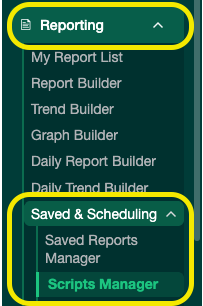
1. From the **Reporting** menu, navigate to either **Saved Report Manager** or **Script Manager**.
 2. Find the report or script you want to hide.
3. Click **Edit**.
2. Find the report or script you want to hide.
3. Click **Edit**.
 4. Uncheck the **Active** checkbox.
 5. Click **Save**.
6. Refresh the page — the report or script will no longer appear in the list.
## Support
**Hours:** Monday – Friday, 8AM – 4PM
**Email:** [support@gocrisp.com](mailto:support@gocrisp.com)
5. Click **Save**.
6. Refresh the page — the report or script will no longer appear in the list.
## Support
**Hours:** Monday – Friday, 8AM – 4PM
**Email:** [support@gocrisp.com](mailto:support@gocrisp.com)