> ## Documentation Index
> Fetch the complete documentation index at: https://docs.gocrisp.com/llms.txt
> Use this file to discover all available pages before exploring further.
# My personal settings
> Every user can configure Personal Settings to pre-fill common options in Report Builder and Trend Builder.
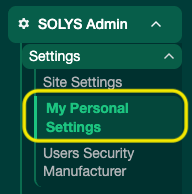
Every user can configure Personal Settings to pre-fill common options in Report Builder and Trend Builder. To access them, go to **SOLYS Admin → Settings → My Personal Settings**.
 ## Report Formatting
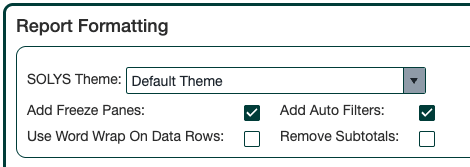
* **SOLYS Theme:** Choose from 3 Crisp-designed themes. The Default Theme is applied if none is selected.
* **Add Freeze Pane:** Freezes panes below the header row and to the right of your last Group By column.
* **Add Auto Filters:** Adds filter dropdowns to your header row.
* **Use Word Wrap on Data Row:** Ensures full text is visible in description columns.
* **Remove Subtotals:** Hides the subtotal rows that appear for each Group By.
## Report Formatting
* **SOLYS Theme:** Choose from 3 Crisp-designed themes. The Default Theme is applied if none is selected.
* **Add Freeze Pane:** Freezes panes below the header row and to the right of your last Group By column.
* **Add Auto Filters:** Adds filter dropdowns to your header row.
* **Use Word Wrap on Data Row:** Ensures full text is visible in description columns.
* **Remove Subtotals:** Hides the subtotal rows that appear for each Group By.
 ## LY Comparison Options
* **Normal (Compare by Week):** Matches the closest date to the prior year.
* **Fiscal Retailer Week:** Matches by fiscal month and week number on the retailer’s calendar.
* **# Week to Offset:** Shifts the LY comparison by a set number of weeks — useful for Easter shifts, ad shifts, or holiday timing differences.
If you change the Week Offset, check **Overwrite LY Comparison Option on all reports** to apply it to your saved reports. When you’re done, reset the offset back to **0** to avoid affecting future reporting.
## LY Comparison Options
* **Normal (Compare by Week):** Matches the closest date to the prior year.
* **Fiscal Retailer Week:** Matches by fiscal month and week number on the retailer’s calendar.
* **# Week to Offset:** Shifts the LY comparison by a set number of weeks — useful for Easter shifts, ad shifts, or holiday timing differences.
If you change the Week Offset, check **Overwrite LY Comparison Option on all reports** to apply it to your saved reports. When you’re done, reset the offset back to **0** to avoid affecting future reporting.
 ## Data Filtering
* **Show Active Items Only:** Limits results to items with at least 1 unit of non-clearance sales, or items tracked in at least 1 store, in the most recent week. Use with caution — this can unintentionally omit items from prior periods.
* **Filter by Sales Dollars:** Omits items below a specified dollar threshold. Requires Sales \$ to be in your report. Note: subtotals and totals will still include the omitted items.
## Data Filtering
* **Show Active Items Only:** Limits results to items with at least 1 unit of non-clearance sales, or items tracked in at least 1 store, in the most recent week. Use with caution — this can unintentionally omit items from prior periods.
* **Filter by Sales Dollars:** Omits items below a specified dollar threshold. Requires Sales \$ to be in your report. Note: subtotals and totals will still include the omitted items.
 ## Additional Options
* **Email Me the Report:** Sends the report to your email every time you click **Run Report** or **Run Report in Background**.
## Saving Your Settings
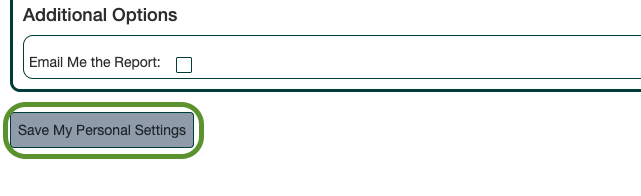
Click **Save My Personal Settings** at the bottom of the page. Your selections will be automatically applied each time you use Report Builder and Trend Builder.
## Additional Options
* **Email Me the Report:** Sends the report to your email every time you click **Run Report** or **Run Report in Background**.
## Saving Your Settings
Click **Save My Personal Settings** at the bottom of the page. Your selections will be automatically applied each time you use Report Builder and Trend Builder.
 ## Support
**Hours:** Monday – Friday, 8AM – 4PM
**Email:** [support@gocrisp.com](mailto:support@gocrisp.com)
## Support
**Hours:** Monday – Friday, 8AM – 4PM
**Email:** [support@gocrisp.com](mailto:support@gocrisp.com)